Warbird Information Exchange

DISCLAIMER: The views expressed on this site are the responsibility of the poster and do not reflect the views of the management.
It is currently Sat Apr 04, 2026 1:20 am

All times are UTC - 5 hours


Classic Wings Magazine WWII Naval Aviation Research Pacific Luftwaffe Resource Center
When Hollywood Ruled The Skies - Volumes 1 through 4 by Bruce Oriss


Post new topic Reply to topic  [ 21 posts ]  Go to page 1, 2  Next
Author Message
PostPosted: Tue Feb 12, 2008 8:21 pm 
Offline
User avatar

Joined: Wed Oct 04, 2006 6:42 pm
Posts: 627
Location: Akron, Ohio
Ok, I know this is a dumb question but...

For all of you with massive amounts of historical photos and even current warbird photos from museums and/or air shows, how do you keep them organized? How are you able to post a picture of a particular subject in 5 minutes of someone else posting a question?

What type of "system" do you use in naming your files? By plane serial number? By plane type? A combination of several things? Do you just add details to the file description?

I guess I just want to see what other people do and get some ideas as I begin to start building my collection/library.

Like I said, kind of dumb and silly, but I was just curious :D
Thanks!


Top
 Profile  
 
 Post subject:
PostPosted: Tue Feb 12, 2008 8:36 pm 
Offline
1000+ Posts!
1000+ Posts!
User avatar

Joined: Wed Sep 12, 2007 5:27 am
Posts: 1531
Location: Serbia
I have only few thousand of the images scanned and stored in my PC and they are organized in two main order. First large section is called Photographs and there are folders with collections like.... "Ruskoi Centralniy Voenoy Musey" or "Kirk Hammet Collection". Other way is by the airplanes. And there are separarated by the wars- WW1, Interwar, WW2 and modern. But there could be also managed by countries.

Not all names are given but I try to give most apropriate name like Bf109G-6 R4 black 4 JG54 East Front Nov 1943. In many times give much shorter name like "Hrabbak Bf109G2" or even shorter. Most important is to include data in the image properties. Right click- Properties and then write in all data about event, author, date, descriptrion, copyright...

Cheers :P

_________________
Owner: http://www.letletlet-warplanes.com
Owner: http://www.letletlet-warplanes.com/forum
Owner: http://www.sreckobradic.com
Email: srecko.warplane@gmail.com
Skype: sreckobradic
Facebook http://www.facebook.com/pages/LetLetLet ... 8234397758


Top
 Profile  
 
 Post subject: ????
PostPosted: Tue Feb 12, 2008 9:02 pm 
Offline
Co-MVP - 2006
User avatar

Joined: Sat May 01, 2004 11:21 pm
Posts: 11475
Location: Salem, Oregon
Quote:
how do you keep them organized?

Kaos theory :? :?
I group by branch ofservice, type, and if enough by unit.

_________________
Don't touch my junk!!


Top
 Profile  
 
 Post subject: Photos
PostPosted: Tue Feb 12, 2008 9:13 pm 
Offline
User avatar

Joined: Thu Jul 06, 2006 10:30 pm
Posts: 102
Location: O'Fallon, MO
By type of aircraft...each one has a folder. When enough, I break them into sub-types. File convention is type-source-sequential number, such as F3F-2-DOLL-002

Rich


Top
 Profile  
 
 Post subject:
PostPosted: Tue Feb 12, 2008 9:58 pm 
Offline
Been here a long time

Joined: Sun May 02, 2004 1:16 am
Posts: 11332
A folder named after the date I took the pictures and a short description?

My heirs can sort them any way they wish I guess.


Top
 Profile  
 
 Post subject:
PostPosted: Tue Feb 12, 2008 11:32 pm 
Offline
Aerial Pirate
User avatar

Joined: Thu May 06, 2004 11:46 pm
Posts: 2002
Location: South San Francisco, CA (next to SFO Airport)
Never a dumb question.

If your talking about photographs, I keep mine in albums by type. Each photograph has a stamp on the back listing the location, date and a unique number for pulling up the negative.

New to the digital end of it, I'm currently storing by air shows and then sub folders for types, and attempting to use my failing memory. Eventually I hope to sort them all by type, but havn't figured out a system for the location of each plane yet.

_________________
Roger Cain
www.sfahistory.org
http://groups.yahoo.com/group/Stearman/


We must limit politicians to two terms:
one in office and one in jail.


Top
 Profile  
 
 Post subject:
PostPosted: Wed Feb 13, 2008 8:16 am 
Offline
User avatar

Joined: Tue Jan 03, 2006 6:37 am
Posts: 830
Location: Chrishall Grange ~ England
Good question ! And it raises another one ...... How much time do you want to spend sorting and filing your images ?

You can use something like Adobe Photoshop ( I use Elements 6 ).
When you import the images it reads the Exif data so it "knows" when you took it. You can add tags to an image and create folders etc.

So you could store the images in a date folder, tag it for the airshow etc.
You can also tag each image by aircraft type / operatior etc etc etc.

Then it's possible to do a search using the tags to find all the tagged images that will match.

I started down this route ~ if your going to be very detailed ~ it will take a lot of time!

If the pc were ever to crash you would lose all the tags anyway.

So I went the low tech route. I have created a series of "My Documents" folders for WW1 Wardirds / WW2 Warbirds / WW2 Trainers etc etc. In each of those I keep folders for each airplane type. Inside those are folders for specific airplanes.

I keep my digital pics in there ~ along with any scanned magazine articles or notes I've made ( saved as a word document ).

I currently store around 200 Giga Bytes of data and everything on the PC is backed up onto a portable external hard drive. ( this is kept at work so if I get burgled or there is a fire I don't loose everything ).

Did I mention I work in IT as a business analyst :oops:

_________________
Blue Skies .....

Peter

Consolidated by US state ~ see if there's a heavy bomber tour stop coming to an airport near you ...... http://www.bomberflight.info

Warbirdapps on facebook ~ every day a new image from my personal journey thru the world of warbirds ..... https://www.facebook.com/Warbirdapps


Top
 Profile  
 
 Post subject:
PostPosted: Wed Feb 13, 2008 8:24 am 
Offline
User avatar

Joined: Tue Jan 03, 2006 6:37 am
Posts: 830
Location: Chrishall Grange ~ England
Just to finish up ..... :shock: my folder structure looks kind like this .....

- My Documents
- WW2 Warbirds
- Hawker Hurricane
- Hurricane XII "Z5140" ~G-HURI ~ HA - C

So when I have an image of a Hurricane with the code letters "HA - C" .... I know exactly where to file it !

I hope this helps :D

_________________
Blue Skies .....

Peter

Consolidated by US state ~ see if there's a heavy bomber tour stop coming to an airport near you ...... http://www.bomberflight.info

Warbirdapps on facebook ~ every day a new image from my personal journey thru the world of warbirds ..... https://www.facebook.com/Warbirdapps


Top
 Profile  
 
 Post subject:
PostPosted: Wed Feb 13, 2008 9:01 am 
Offline
1000+ Posts!
1000+ Posts!
User avatar

Joined: Wed Jun 30, 2004 1:49 am
Posts: 1521
Location: Zurich & Zug / Switzerland
Okay...

let's have a look at my external 320 GB HDD....

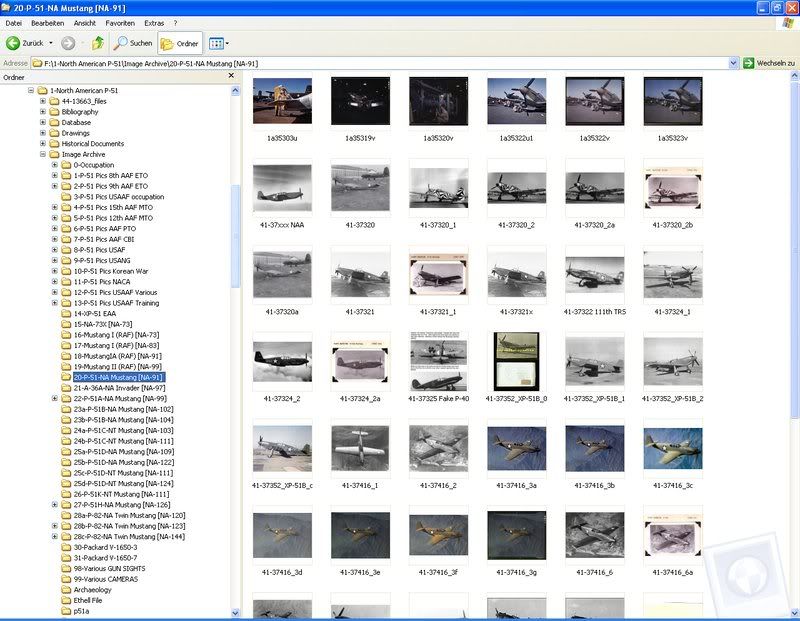
for my P-51 files I do have the following:

general folders for photographs, tech docu, database, drawings, etc.
then within each subfolders for differeent topics...

let's look at the photo folders...

theatres of operations, subfolders for various theatres of operations, next level are groups, next levels are squadrons, next level contains photos, by serial number (mainly)

also folders for each sub-type (with NAA designation), next level production batches which contain photos again sorted per serial-number

Image

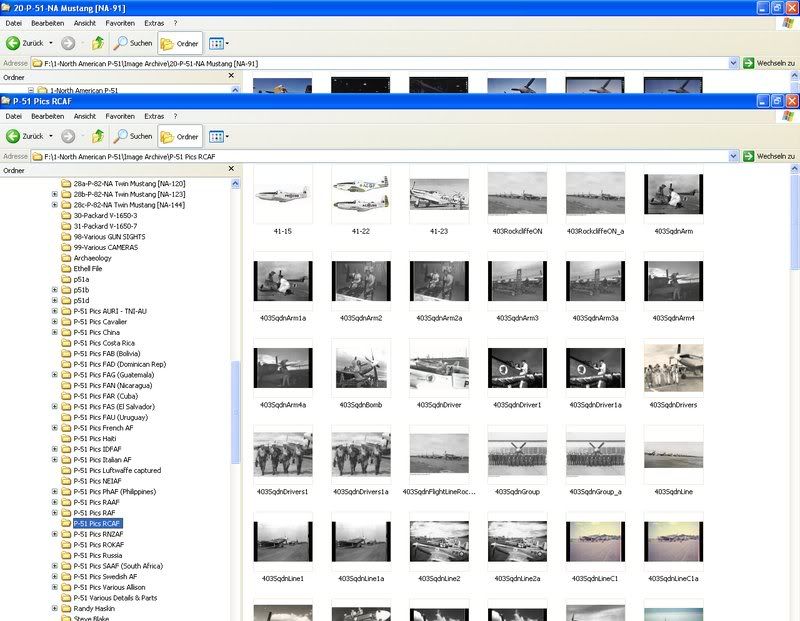
scrolling down...

also folders for each Air Force that operated the type.... again with subfolders for units, etc.

Image

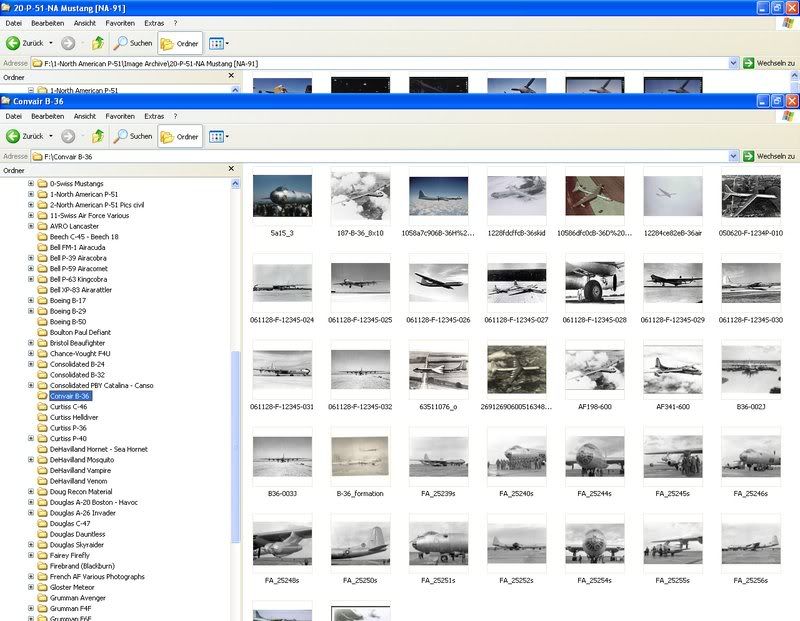
this also applies for other a/c types of interest.....

Image

not bad, eh ?

Martin

_________________
Flying is easy: just learn how to throw yourself at the ground and miss


Top
 Profile  
 
 Post subject:
PostPosted: Wed Feb 13, 2008 9:08 am 
Offline
1000+ Posts!
1000+ Posts!
User avatar

Joined: Wed Jun 30, 2004 1:49 am
Posts: 1521
Location: Zurich & Zug / Switzerland
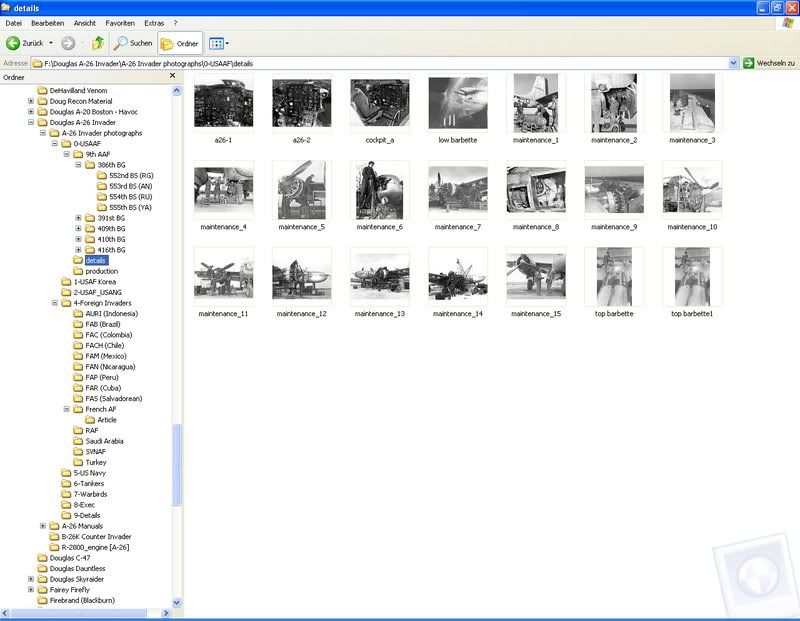
and as an additional example.... here's the Douglas A-26 folder....

Image

_________________
Flying is easy: just learn how to throw yourself at the ground and miss


Top
 Profile  
 
 Post subject:
PostPosted: Wed Feb 13, 2008 9:55 am 
Offline
Long Time Member
Long Time Member
User avatar

Joined: Tue May 11, 2004 5:42 pm
Posts: 6884
Location: The Goldfields, Victoria, Australia
I have a highly trained Gentleman's Personal Gentleman called Jeeves who mixes a d@mn fine Martini and organises my photographs as I take them. He also proofreads my writing and polishes the computer screen. He suggests great tweaks to my poorer writing efforts. His toughest job is refiling the books on the shelf after I've used them.

When I'm awake, however, I have a failing memory and numerous folders for the digital and scanned photos. I have drop files and photo boxes alpha-numeric by type for the real pictures, and manila folders (inc photos) for types of major interest. We will not mention the boxes of lose photos.

Once, I filed all the Photos at the Warbirds Worldwide offices (and no, I don't know what happened to them either). However, I dumped all the blasted P-51D photos in a box and gave them to Paul Coggan to sort, starting a long-running joke and a lifetime aversion to the type.

_________________
James K

"Switch on the underwater landing lights"
Emilio Largo, Thunderball.

www.VintageAeroWriter.com


Top
 Profile  
 
 Post subject:
PostPosted: Wed Feb 13, 2008 12:07 pm 
Offline
3000+ Post Club
3000+ Post Club
User avatar

Joined: Thu Apr 27, 2006 2:10 pm
Posts: 3257
Location: New York
The main collection of photos that I maintain, taken by my late friend Dick Kamm, consists of slides that he manually sorted by manufacturer, then type, then serial or registration number. I typically scan them when needed to answer a query or for my own purposes, and organize the files on disc in that same way.

Reportedly, it took Dick a LOT of evenings to keep his slide collection properly organized, but I think he loved every minute of it.

My own photos are a mixture of slides, negatives, and digital, and because the negs have several types of aircraft in one strip, I cannot organize them by type. So mine are organized by date taken and by roll of film. I kept up a database of the photos that could be sorted or queried by type and serial for a while, but I've fallen years behind in updating it.

The result of this is that if there is a call for, say, pics of Spitfire TE308, I can find all of the ones in Dick's 70,000-pic collection in a few minutes. But in my own collection of only 10,000 pics which I am more familiar with, it would take me much longer to try to remember all the occasions on which I saw the aircraft, and I probably would miss some.

On the other hand, my filing system has advantages for other kinds of queries. There is no practical way that I could pull all of Dick's pictures from Oshkosh 1981. But mine are all together and could be accessed very quickly.

As I scan the collections, I could set up a cross-referenced database so that pics from both collections could be pulled quickly based on either aircraft or time/event criteria. But it would be time consuming and at this point I do not get enough calls to search the collection to make it pay off. If I make the collection more available as a public resource in the future, it may be worthwhile.

August


Top
 Profile  
 
 Post subject:
PostPosted: Wed Feb 13, 2008 6:25 pm 
Offline
User avatar

Joined: Tue Jul 19, 2005 1:14 am
Posts: 854
A photographic memory helps, but mine is failing slowly... so...

Whether on the PC, an external drive, or stored on CD/DVD, all of my digital files follow the same basic system.
Although some may find it to be fairly organized, it's actually a bit of a mess. Someday I'll get around to changing
the filenames to be a bit more uniform... maybe...

Here's the WWII folder on my PC:

Image


USA folder:

Image


US Aircraft folder:

Image


P-40 Warhawk folder:

Image


USA P-40 folder:

Image


P-40M/N folder:

Image


P-40 USAAF folder:

Image


P-40 Survivors folder:

Image


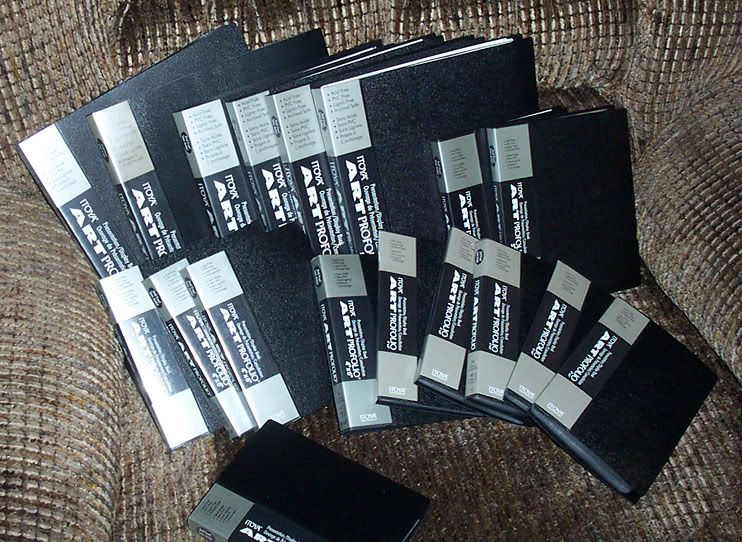
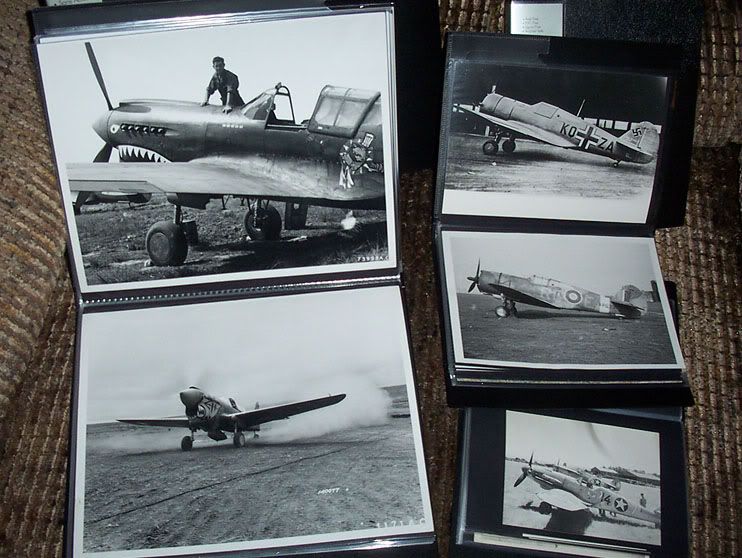
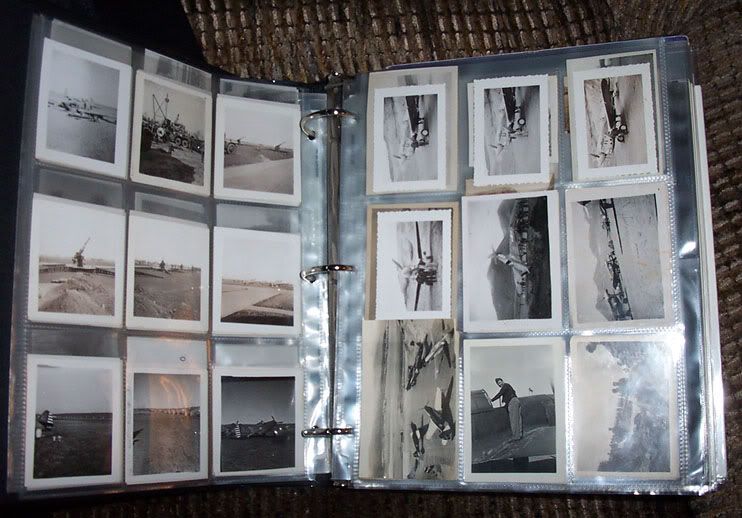
For the actual photos, I use artist portfolio books as well as binders for storage:

Image

Image

Image


Fade to Black...


Top
 Profile  
 
 Post subject:
PostPosted: Thu Feb 14, 2008 12:46 am 
Offline
Pvt. Joker
User avatar

Joined: Tue Oct 11, 2005 12:22 pm
Posts: 1012
Location: Location: Location!
I like to document things as they are disassembled (makes life easier on long-term projects). My filing system isn’t all that complicated, but I use Google Picasa on my laptop in the shop.

http://picasa.google.com/

Here’s a screenshot of some of my stuff. What I like about it is the ability to visually browse, move and zoom in.

Image

_________________
Image
Commemorative Air Force
Experimental Aircraft Association
Warbirds of America

What are you waiting for? Join us!

Best way to contact me- email my last name @gmail.com


Top
 Profile  
 
 Post subject: ???
PostPosted: Thu Feb 14, 2008 12:03 pm 
Offline
Co-MVP - 2006
User avatar

Joined: Sat May 01, 2004 11:21 pm
Posts: 11475
Location: Salem, Oregon
Hey Eric,
I don't see MY T-28 tail there :shock: :idea: :wink:

_________________
Don't touch my junk!!


Top
 Profile  
 
Display posts from previous:  Sort by  
Post new topic Reply to topic  [ 21 posts ]  Go to page 1, 2  Next

All times are UTC - 5 hours


Who is online

Users browsing this forum: No registered users and 54 guests


You cannot post new topics in this forum
You cannot reply to topics in this forum
You cannot edit your posts in this forum
You cannot delete your posts in this forum
You cannot post attachments in this forum

Search for:
Jump to:  
Powered by phpBB® Forum Software © phpBB Group